Save host config for ssh on mac

The most simple way to save host configurations for easy ssh’ing from Terminal on mac:
Add host entries to ~/.ssh/config file

This file doesn’t exist by default so you can easily create the file and add your host shortcuts.

For example, if you’d like to be able to type

user$> ssh MyHost

instead of ssh mycomplicatedhostname.host.com

Create the config file and add the following line:

Host MyHost
Hostname mycomplicatedhostname.host.com
Port 22
User myUser

English word list for solving Jumble puzzle

I’ve been playing around with the iPhone SDK, and decided on a “Jumble Solver” as my first as a good learning project. It’d include a whole bunch of objective C and general programming concepts – Recursion, delegation, Interface builder, inheritence, sqlite.

My general approach was to build a decision tree with the available characters in the jumble, and compare the leaf nodes with an english dictionary. Finding a sqlite database of words … or rather a list of words was really hard. I stumbled upon a word list in text format found at the national puzzle solvers website. To dump that into a database I used the following simple ruby script. You’ll notice I limited the words to less than 7 characters. The search algorithm is n! complexity so limiting the jumble to 7 characters proved optimal performance. :

require ‘sqlite3.rb’
db=SQLite3::Database.new(“WordDatabase.sql”)
word_list=File.open(‘words.txt’).readlines

word_list.each do |word|
if word.length <8
db.execute(“INSERT INTO words (word) VALUES (?)”, word.chomp)
end
end

iPhone app crash dumps

Generating Crash Reports from iPhone apps

It wasn’t obvious to me how to generate a crash dump from an iPhone add hoc deployment. It turns out that the iPhone OS creates a record of the crash event when it occurs. The next time you connect your device to iTunes, iTunes downloads the crash dump to your computer automatically.

Crash Reports on Macs

  1. Open a new finder window.

  2. Choose Go > Go to Folder.

  3. Enter ~/Library/Logs/CrashReporter/MobileDevice.

  4. Find the folder named after your device and go in there.

  5. There should be a file named after the application you’re testing.

Crash Reports from Windows

There are 2 places where windows may place your crash dump, replacing with your Windows user name shows them below.

Crash log storage on Windows Vista

C:\Users\\AppData\Roaming\Apple computer\Logs\CrashReporter/MobileDevice

Crash log storage on Windows XP

C:\Documents and Settings\\Application Data\Apple computer\Logs\CrashReporter

Once again, there is a folder named after your device’s name and a crash logs for the application you’re testing.

Cruisecontrol and ant errors using gmail

Out of all the hours I’ve spent writing cruisecontrol, ant, and nant scripts, most of them have been troubleshooting mail tasks.

In attempting to set up cruisecontrol and ant projects for our iPhone application I ran across the following error when trying to send email using gmail:

Could not Connect to smtp host: smtp.gmail.com, port 587

Fixing this was dead easy after scouring the internet. It seems that neither ant or cruisecontrol play well with gmail over 587. Changing the mailport to 465 solved the problem:

Installing and Configuring Subversion

I also recently went through the process of installing and configuring subversion for a company.

Here were some of the notable steps


References:


Steps:

INTSTALLING AND MAKING SUBVERSION AVAILABLE

  1. Install subversion:
  • yum install subversion


  1. Install subversion mod_dav_svn plugin for apache 2.0 integration:
  • yum install mod_dav_svn


  1. Update the httpd.conf to load the mod_dav_svn.so module before any other subversion tasks. Add the following lines to /etc/httpd/conf.d/subversion.conf

    LoadModule dav_module         modules/mod_dav.so

    LoadModule dav_svn_module     modules/mod_dav_svn.so


    * If the firewall has www turned off on machine, you must enable this.  For example, in fedora, this can be done via: 

            System-Security Settings and Firewall -> Add www to allowed


CREATING THE REPOSITORY

The following steps all happen on the server.

1. Make the svn repository

  • mkdir -p /home/repos/svn/vrepos
  • svnadmin create /home/repos/svn/vrepos
  • cchown –R apache.apache /home/repos/svn

    * Note for SELinux / Fedora Core 3+ / Red Hat Enterprise users: 

In addition to regular Unix permissions, under SELinux every file, directory, process, etc. has a ‘security context’. When a process attempts to access a file, besides checking the Unix permissions the system also checks to see if the security context of the process is compatible with the security context of the file.

Assuming your linux box has SELinux enabled, to run Subversion under Apache, you have to set the security context of the repository to allow Apache access (or turn off the restrictions on Apache, if you think all this is overkill). The chcon command is used to set the security context of files (similarly to how the chmod sets the traditional Unix permissions). For example, one user had to issue this command

chcon -R -h -t httpd_sys_content_t /home/repos/svn

2. Set up a directory to import

– mkdir /home/repos/tmpsvn/vrepos

– cd /home/repos/tmpsvn/vrepos

- mkdir branches

- mkdir tags

- mkdir trunk

- mkdir trunk/ThirdParty

- mkdir trunk/Build – add build scripts to this folder

- mkdir trunk/Source – add Stargate and EcoTool folders to this


  1. Add info to httpd configuration so that apache can serve repository and it will be password protected:


<Location /vrepos>

    DAV svn

    SVNPath /home/repos/svn/vrepos

    SSLRequireSSL

    AuthType Basic

    AuthName "Subversion repository"

    AuthUserFile /home/repos/svn/svn-auth-file

    Require valid-user

</Location>


  1. Add the users to the password file:
    1. For each user:

    $$ ### First time: use -c to create the file

    $ ### Use -m to use MD5 encryption of the password, which is more secure

    $ htpasswd -cm /home/repos/svn/svn-auth-file davidq

    New password: ***** 

    Re-type new password: *****

    $ htpasswd -m /home/repos/svn/svn-auth-file rossa

    New password: *******

    Re-type new password: *******

    Adding password for user rossa


  1. Configure Putty to go against repository: https://surveyor.verdiem.com/vrepos


This is how the repository will look on the 


Installing testlink and JIRA

I just went through the process of installing testlink for internal test case management, so I thought my experiences were worth a blog post.

Testlink 1.7 is an online testcase management system. It allows you to manage the testing cycle by managing test plans, test cases, test execution results.

Test link is integrated with a php database and is easily installed on a lamp stack.


Great instructions and information on installing and managing testlink can be found in the following links or at the test link website. The details in these documents goes far beyond the details in this doc. I’ll just outline some of the specific settings I used when configuring testlink


Test link website: http://www.teamst.org/


Installation:

1. Install background services

* You need to make sure that the required services are installed on the machine. Mainly apache, mysql, php. Additionally, you need to install the php_mysql adapter. I needed to install this. In order to do so I actually re-compiled the php code this time including the mysql adapter. I recently found out that I could have just installed the mysql_php adapter using yum unlike what I had originally thought.


2. Tranfer the testlink installation zip and uncompress files into /home/repos/testlink

* The testlink zip file can be found on their website or at:


3. Point apache at the install directory by adding /etc/httpd/conf.d/testlinnk.conf with the following contents:


3. Change the owner of /home/repos/testlink to apache apache

– chmod apache.apache /home/repos/testlink


4. I never could actually get the security configurations correct with SELinux so that apache would actually serve the page. So I ….. disabled SELinux

– $ Echo 0>/selinux/enforce

To re-enable you’d add the following:

– $ Echo 1>/selinux/enforce

I also believe that when the machine is rebooted, seLinux may be re-enabled so testlink might just stop working.


5. Generate database tables and add data (create default or transfer from previous db)

– Go to http://localhost/testlink and login with admin admin (default which should be changed.)

– Follow the installation defeaults.

– All should go swimmingly and you’ve got a testlink instance up and running

– At this point you should be ready to add test plans, projects, test runs, users yada yada yada


JIRA integration

  • Note – as good as I think testlink is, it’s a bit week in it’s integration with bug tracking system. It essentially allows you to launch jira within testlink to create a bug, and then manually add the bug id to a test result.
  • Test results show the bugs attached to them and these bugs can be launched from within testlink (which is kinda nice). Also, when a bug is resolved, it shows up as struck out within the test execution record.
  1. Edit /home/repos/testlink/testlink_170/custom_config.inc.php file to specify that it is integrating with JIRA for bug tracking.


  1. Edit /home/repos/testlink/testlink_170/cfg/jira.cfg.php to point at the jira instance (database, database user, etc).


Restart httpd and you’re good to go.

Top 100 Novels

I was in Barnes and Noble tonight and I was reminded of *The Book List.* While in university, me and my room-mates, namely Brent and Jack Collier, began a “book challenge.” The goal …. race to see who could read the top 100 novels first.
Here is the list which we were following. Several years later, I’ve made some progress, but I’ve got years of reading left … my count is about 34 … all the books in italics.

Favorite reads were A Prayer for Owen Meany, The picture of Dorian Gray, Anne of Green Gables (yes, I’ll admit it), and Fugitive Pieces.

Books that were as painful as chewing tin foil were Atlas Shrugged and Outlander. I wish I could have those hours back …

A Prayer for Owen Meany – John Irving
Fall on Your Knees – Anne Marie MacDonald
The Handmaid’s Tale – Margaret Atwood
Lord of the Rings J.R.R Tolkien
Fifth Business Robertson Davies
The Catcher in the Rye – J.D Salinger
To Kill a Mockingbird Harper Lee
Anne of Green Gables L.M Montgomery
The English Patient Kichael Ondaatje
The Stone Angel Margaret Laurence
The Diviners Margaret Laurence
A Fine Balance Rohinton Mistry
The Grapes of Wrath John Steinbeck
Catch-22 Joseph Heller
One Hundred Years of Solitude Gabriel Carcia
Gone With the Wind Margaret Mitchell
The Great Gatsby F. Scott Fitzgerald
Ulysses James Joyce
Not Wanted on the Voyage Timothy Findley
Outlander Diana Gabaldon
The Foutainhead Ayn Fand
Alias Grace Margaret Atwood
Shogun James Clavell
Fugitive Pieces Carol Shields
The Stone Diaries Carol Shields
Jane Eyre Charlotte Bronte
Possession A.S Byatt
The Stand Stephen King
1984 George Orwell
Atlas Shrugged Ayn Rand
Midnight’s Children Salman Rushdie
The Edible Woman Margaret Atwood
Pride and Prejudice Jane Austin
The Pillars of the Earth Ken Follet
The Apprenticeship of Duddy Kravitz Mordecal Richier
Wuthering Heights Emily Bronte
The Piano man’s Daughter Timothy Findley
Les Miserables Victor Hugo
Brave New World Aldous Huxley
Angela’s Ashes Frank McCourt
Beloved Toni Morrison
In the Skin of a Lion Michael Ondaatje
The Hobbit J.R.R Tokien
Cat’s Eye Margaret Atwood
The Robber Bride Margaret Atwood
Emma Jane Austin
Beach Music Pat Conroy
The Wars Timothy Findley
Snow Falling on Cedars David Guterson
The World According to Garp John Irving
She’s Come Undone Wally Lamb
A year in Provence Peter Mayle
Who Has Seen the Wind W.O Mitchell
Slaughterhouse 5 Kurt Vonegut
The Temptations of Big Bear Rudy Wiebe
Generation X Douglas Coupland
Great Expectations Charles Dickens
The Count of Monte Cristo Alexandre Dumas
Lord of the Flies William Golding
A Room with a View E.M Forster
Tess of D’Ubervilles Thomas Hardy
Tropic of Cancer Henry Miller
Roots Alex Haley
Hannibal Thomas Harris
The Old Man and the Sea Ernest Hemmingway
Dune Frank Herbert
Stephenwolf Herman Hesse
Of Human Bondage W. S. Maugham
The Razor’s Edge W. S. Maugham
Animal Farm George Orwell
Gravity’s Rainbow Thomas Pynchon
The Celestine Prophecy James Redfield
Barney’s Version Mordecal Richier
The Pilot’s Wife Anita Shreve
Trinity Leon Uris
The Under Painter Jane Urquhart
The Once and Future King T.H. White
Picture of Dorian Oscar Wilde
Flowers in the Attic V.C Andrews
Foundation and Earth Issac Asimov
Surfacing Margaret Atwood
Clan of the Cave Bear Jean Auel
Illusions Richard Bach
Tara Road Maeve Binchy
Summer Sisters Judy Bloom
A Woman of Substance Barbara Taylor Bradley
The Mountain and the Valley Ernest Buckler
The Master and Margarita Mikhail Bulgakov
A Time for Judas Morley Callaghan
The Artist’s Way Julia Cameron
Breakfast at Tiffany’s Turman Capote
Ender’s Game Orson Scott Card
The Hunt for Red October Tom Clancy
2001: A Space Odessey Arthur C. Clarke
Beautiful Losers Leonard Cohen
Microserfs Douglas Coupland
The Power of One Bryce Courtenay
The Deptlord Trilogy Robertson Davies
Captain Corelli’s Mandolin Louis de Bernieres
David Copperfield Charles Dickens

Perfmon performance logs in XP

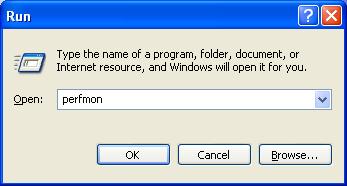
1. Open perfmon: Start->Run -> perfmon

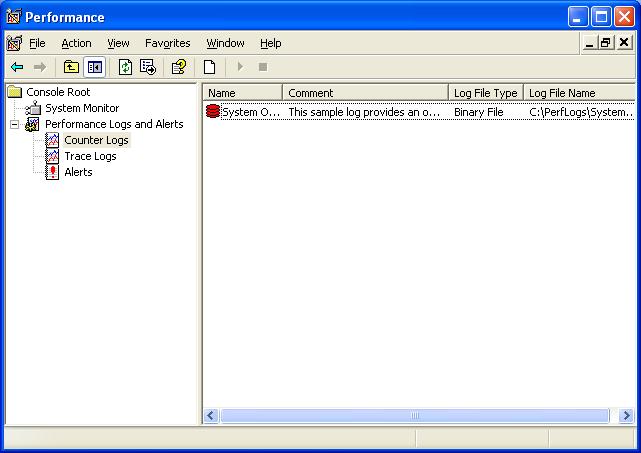
2. From within Counter Logs node, right click and select “New log settings …”

3. Enter the name “AttassaLogSettings”

4. Click “Add Counters”:

5. Change settings to match below screenshot (Select Process from the performance object drop down, outlook from the process list on the right, and select all counters option)

6. Click Add, then close

7. Click OK and if prompted to create a PerfLogs folder, select Yes

8. Perform performance tests.

9. Whenever you’re done, right click AttassaLog-> Stop

10. The most recent perflog test result will be in C:\PerfLog folder:

My Work Visa

In the last 3 years while working with Saflink, Verdiem, and Invisible Software Inc, I’ve been through the legalities, and process of acquiring several US working visas … L1-B, H1-B, and 3 TN’s. Oh, and I was also working with Microsoft on getting TN status to work with them.
Here’s the top 5 things I’ve learned:

1. Although big, scary, and intimidating, Imigration officers are your friends.
Yup, those guys sure know how to make a person feel guilty …. Even if there’s nothing for you to feel guilty about. Each time I get through the application interview, I feel a bit dirty. I feel like I’ve done something wrong … even though I haven’t. But …. I’ve learned that these guys actually are your friends. While it seems like it, there, not actually out to get you, or to stump you on your work history, or job role. They’re simply looking to do their job, and gather the information they need to stamp your working visa.

2. These guys have heard about google.
It really floored me the first time I applied for a visa with Invisible Software the information they had on the company and myself. They knew who worked for the company, where some of the people had worked before, when I’d worked with some of the people currently with the company, information of the product. While I knew that they had access to immigration information, I’m not sure why I figured they didn’t have access to google, and the wealth of information available for anyone on the internet.

3. Make your application package complete and professional looking.
While working at Saflink, we had several lawyers draft up the documentation needed for application. The lawyers coached me on how to conduct myself during the interview. Immigration officers spend their days reviewing and conducting these interviews. Make it easy on them by having all of your documentation ready, ordered, and professional looking. When applying with Invisible Software, I had the needed documents, but they didn’t have the look of something placed together by lawyers. It makes a difference

4. They mainly just want to know that you’re not sneaking into the country.
This may seem stupid to say, but it took me a while to realize this. Meeting the requirements of a NAFTA position and proving that your company has the ability to pay you, isn’t their way to best have fun with a stressed out traveler. It’s not a game of *how can we stump them* that they like playing. At the root of these questions is “Is this guy trying to game the system and create a porous border for himself?” Did this guy just doctor up documents for himself, withdraw $50 and show up at the border?

5. Just tell the truth
This of course seems obvious, but when under the critical eye of the scary Immigration officer it might seem tempting to stretch truths to make the process easier for yourself. Invisible Software is a small software company. It’s received funding (but not like Verdiem ala Kleiner Perkins) and is financially stable (but not like Microsoft), but not at the same level as Microsoft. While it’s tempting to claim billions in funding, and Microsoft revenues, there’s nothing wrong with just saying “Invisible Software received funding that will provide runway for at least a year, and the goal is that revenue will extend the runway. Currently there are only non-paying beta users, but there will be a paid version available in the future.”

My Own worst Critic

For some reason, I find myself sitting in Edmonton International terminal, contemplating my response to self-criticism, as I wait for my flight to Seattle. Maybe it’s that holiday time of year where I begin to reflect on the year that was, but I’m reliving a few moments within the last year where I became critical of myself, and thinking about how I handled my own feedback. I guess you could say that I’m being critical of the way that I criticize myself.

After a terrible performance in Bozeman Montana I was convinced that I’d lost whatever ultimate Frisbee skill and talent that I once had. After receiving negative feedback on my attempts to generate demo videos for our product, I was convinced that I had no place in producing marketing material.

In both situations, I think that by admitting fault, I did the first thing correct. I passed a self reality check. Instead of ignoring the facts, I accepted that my performance wasn’t at the level that I expected of myself. It seems like this is the righteous decision to criticize ourselves for our shortcomings. After accepting such criticism I think there’s 2 ways where I go wrong handling this information.

1. I use the criticism as a dodge.

I think that a lot of time, self-criticism serves as a way of me avoiding doing something much harder. It seems odd, but I think it’s true that often it’s easier to call yourself fat rather than diet and exercise, easier to call yourself a poor programmer and logician, than to take the effort to get better.

2. I focus on the criticism instead of what I can do about it.
“I’m fat, and unattractive. I’m never going to meet anyone and have a family.” Why instead don’t we say “I’m fat, and unattractive. I think whenever I’m bored or anxious, I fall into the habit of eating pretzels. Maybe I can grab a water instead”
I read something from Eric Maisel a while ago about this. He suggests that whenever dealing with criticism, either self or external, is to state the facts, and then say “and ….” I spent a week generating a demo video, and it didn’t meet the standard of what our team expected and ….. while I realize that I failed this time, it was my first time doing such a thing, I learned that I need to focus on the higher level goal of the demo video rather than subtle details such as smooth transitions and voice overs. I realize that I need to produce a script that makes sense as the first step to generating a video. I realize that I need to let the script drive the actions instead of the actions drive the script.

The alternative to self criticism isn’t denial or wandering around in ignorance. Never would you say “I don’t make mistakes. I think for myself, the most effective alternative is stating the facts, feeling the bit of pain, then moving on to what I can do about it, and what I learned from the mistake.

BTW … I’m actually not fat and lazy ….. but I am a poor programmer … which is why I focus on breaking the software with internal tools ☺